A pool gate that won't latch, a dead streetlight, a cracked sidewalk. Report it from the curb with a photo, and HOACraft suggests the category, priority and vendor, warns you about repeats and duplicates, and tracks it to done.
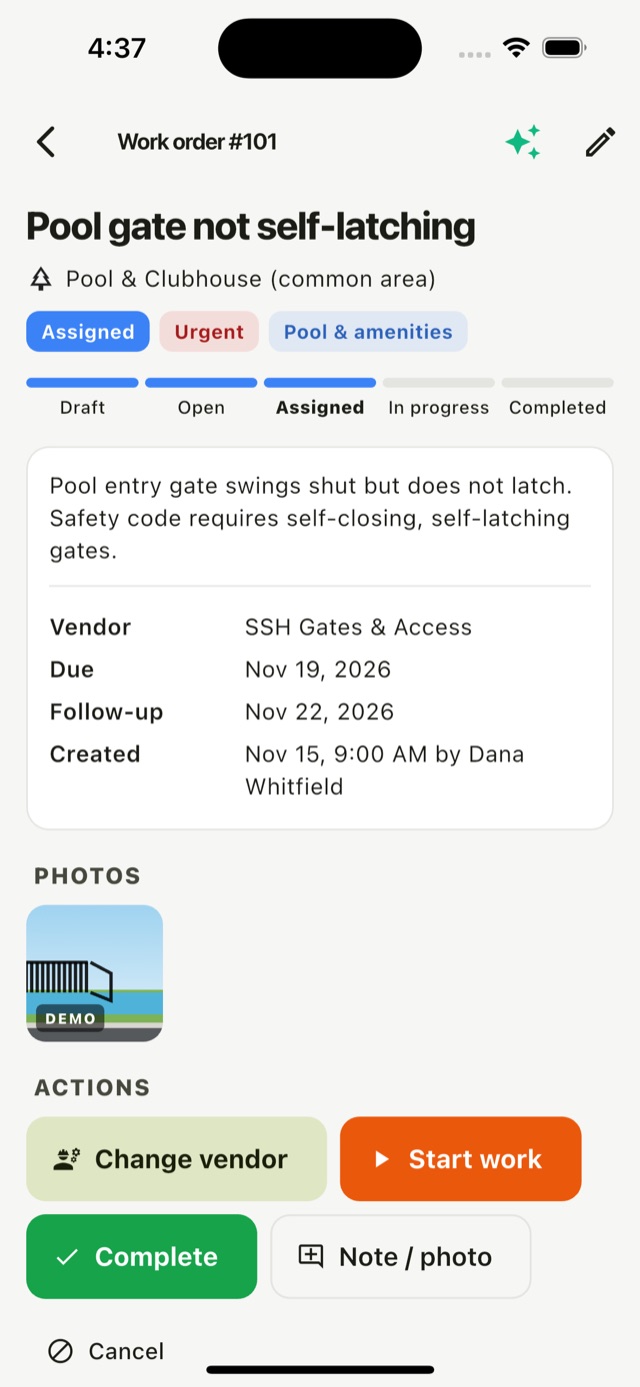
Status moves in one direction only (draft, open, assigned, in progress, completed), with cancel and reopen. Every change records who and when.
At a common area or a property. Photo, a sentence of description, done. Drafts stay on the phone until you submit.
Category, priority and vendor are suggested from the description. Safety words like "gate won't latch" raise it to urgent.
Pick the vendor. Set a due date and a follow-up date, which puts it back on a future drive.
Completion needs notes, and photos if you have them, so the board can see what was done.
The same gate fixed three times in a quarter is a different job from a gate that broke once.
Two or more work orders of the same kind at the same place within 90 days are flagged, with a suggestion to look for the root cause.
If something's already open at that spot, you see it before you file a second one.
Pools, ponds, entrances and clubhouses are on the drive map next to the homes, so they get looked at too.
Where the association maintains lawns or exteriors, those issues become work orders automatically instead of owner violations.
Open work orders and follow-up dates join the open-items route, so finished work is actually looked at.
Every status change, vendor change, note and photo is on the work order's timeline.
HOACraft sends each submitted work order to your platform and keeps it in step as it moves.
work_order.createdsubmitted from the field, with photos and locationwork_order.updatedstatus or vendor changed, with the previous statuswork_order.completeddone, with completion notes and photosRun the vendor workflow in your own system? Send status changes back and inspectors see them on the phone.
{
  "type": "work_order.completed",
  "data": {
    "work_order": {
      "id": "wo-ho4l8rev40-b",
      "number": 106,
      "status": "completed",
      "title": "Pool gate latch broken",
      "category": "fencingGates",
      "priority": "urgent",
      "location": {
        "kind": "common_area",
        "address": "Pool & Clubhouse"
      },
      "vendor": {
        "id": "v-ssh",
        "name": "SSH Gates & Access"
      },
      "completed_at": "2026-11-13T16:00:00.000Z",
      "completion_notes": "Latch and closer replaced, tested"
    }
  }
}We'll map one community's common areas and vendors and run the first drive with you.
